The file is over 200 MB. Install it on the PC that runs PrintExp.
+What your computer needs
It needs 16 GB of memory, 6 cores and 15 GB free. Windows: Windows 10 (64 bit, 21H2 or newer) or Windows 11. Mac: a Mac with Apple silicon (M1 or newer) on macOS 12 or newer. On a Mac, UPrint makes the job and PrintExp on your PC prints it.
After the trial: from $40 a month, plus tax.from R670 a month, VAT included.See the DTF prices
UPrint Studio DTF RIP
Lay out your sheet and print it, up to 45 cm (17.7 in) wide.
It needs 16 GB of memory, 6 cores and 15 GB free. Windows: Windows 10 (64 bit, 21H2 or newer) or Windows 11, a zip with the installer inside. Mac: a Mac with Apple silicon (M1 or newer) on macOS 12 or newer.
After the trial: from $34.99 a month, plus tax.from R649 a month, VAT included.See the prices
It needs 8 GB of memory, 4 cores and 10 GB free. Windows: Windows 10 (64 bit, 21H2 or newer) or Windows 11, a zip with the installer inside. Mac: a Mac with Apple silicon (M1 or newer) on macOS 12 or newer.
After the trial: from $24.99 a month, plus tax.from R400 a month, VAT included.See the prices
Questions before you start
+Can I try it before I pay?
Yes. Download the free trial and the full software runs for 21 days on your own computer. No card is needed. Not a cut down demo, the same build the paying customers get.
+What happens after I pay?
On the free trial, pick a plan in the app and pay with the same email, and the app unlocks by itself. You also get an order code and a download link by email: on another computer, install it, enter the code, and it activates itself. Your colour environment installs with it, so there is nothing to load by hand.
+How many computers?
Two. One order code runs on two computers in your business, and you can reinstall on them any time with the same code. A free trial runs on one computer. If a machine dies or you replace it, send us your order code and we will move you across.
+Does it run on a Mac?
Yes. UPrint Studio RIP and UPrint Design RIP run on a Mac with Apple silicon (M1 or newer) on macOS 12 or newer, and on Windows 10 or 11. Roll DTF prints from a Windows PC, because PrintExp is Windows software: a Mac can make the job, and the Windows PC prints it.
+Do I need to buy a UPrint printer as well?
No. If you already own a compatible press, the software is sold on its own and works with the press you have.
How it works
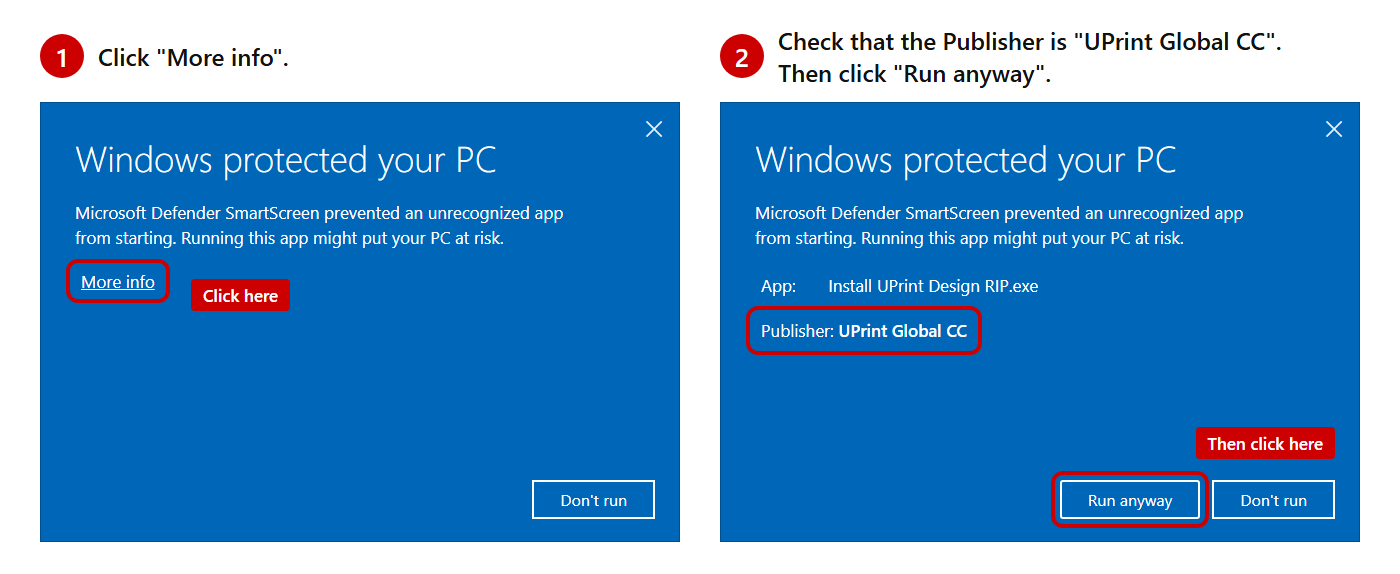
Windows: open the zip and run the installer. No administrator password is needed.Blue box? Windows shows it for new apps. Click More info, check that the Publisher is UPrint Global CC, then click Run anyway.The box for Design RIP. For Studio RIP, the App line names Studio RIP.Mac: move the app to Applications. macOS asks you to allow it once.
Open the app. Type your name and email, pick your printer, and press Start my free trial.
On day 22 the app locks until you buy. Pick a plan in the app, pay with the same email, and it unlocks by itself.
The internet is needed the first time the app opens. One free trial per computer and per email.