
Guide · UPrint Design RIP and Studio DTF RIP · DTF
Build a DTF gang sheet and fill the roll
A gang sheet puts many designs on one piece of film, so one print makes them all. In UPrint you lay out a page or a whole roll, and one button fills the roll with copies of a logo.
Page or roll
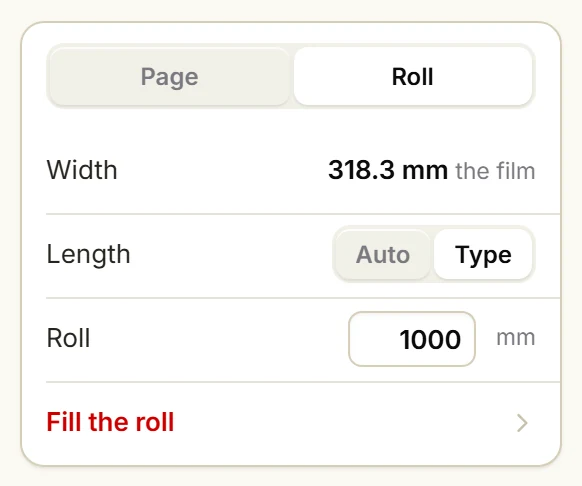
Press Print and pick DTF roll in Print to. Under Sheet, pick Page for a set size, or Roll for film off the roll.
On a roll, Width is your film. Length is Auto, where the roll ends 5 mm (0.2 in) after the last logo, or Type, where you set the length in mm.
On the UPrint Studio DTF RIP, and on a Design RIP licence for printers up to 45 cm (17.7 in), a wider film shows Width 450 mm (17.7 in) with the words Studio RIP limit or your licence limit.
Fill the roll, step by step
1Open your logo and pick the DTF printer
Open the logo. A see-through background (PNG) is best: white prints wherever any other ink prints.
Press Print. In Print to, pick DTF roll.
2Pick Roll and type the length
Under Sheet, press Roll.
Under Length, press Type, then type the length in mm. For example 1000 for one metre (39.4 in).
3Press Fill the roll
One logo on the sheet? Press Fill the roll. Several? Pick the one to repeat first.
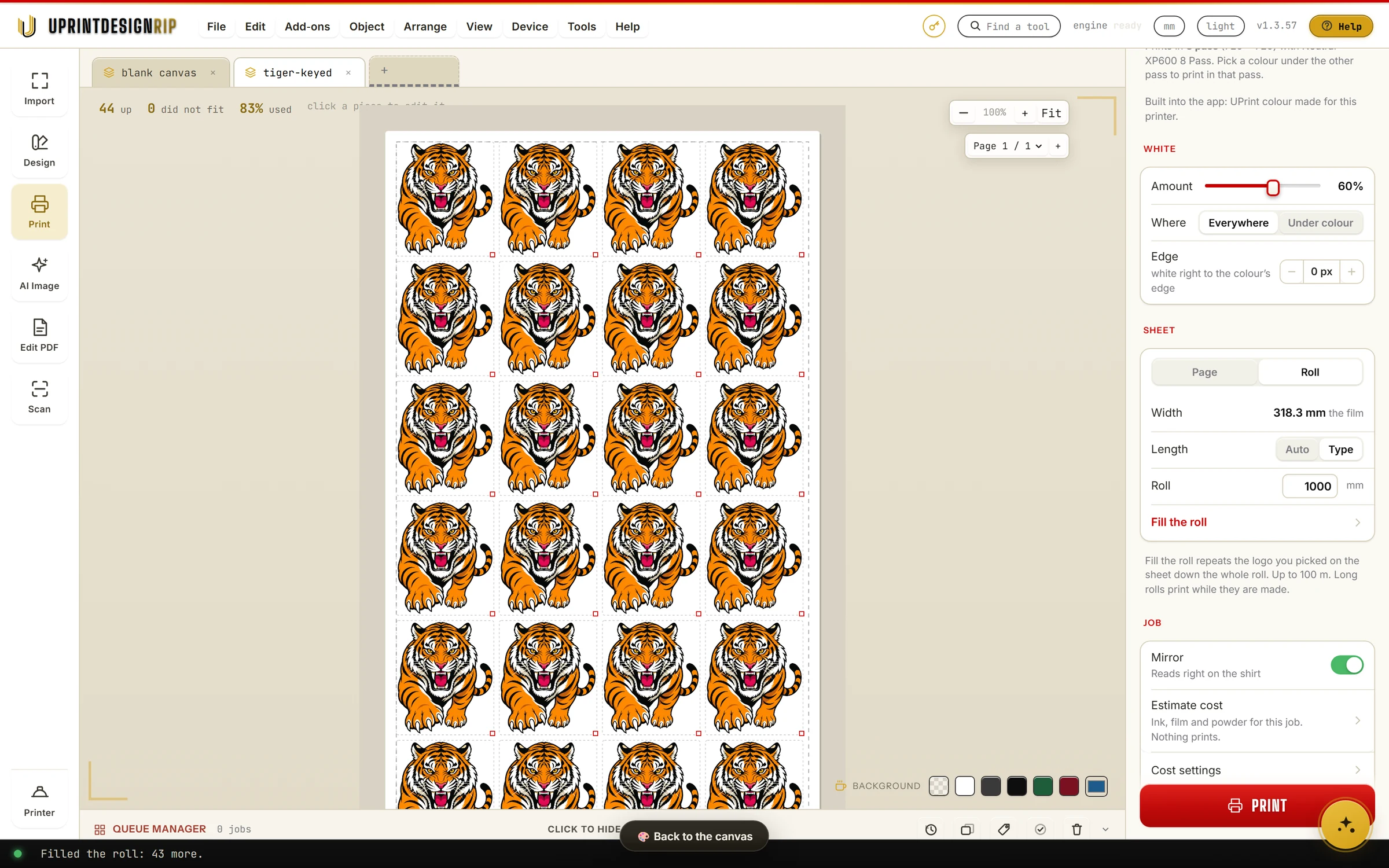
The bar at the bottom says how many it added, for example: Filled the roll: 43 more.
Fill the roll keeps the logos already on the sheet and fills the gaps between them, with the sheet's own gap and margin.
4Check the sheet
In Design RIP, press Peek at the print sheet at the bottom of the canvas.
The top line says how many fit, for example: 44 up, 0 did not fit, 83% used.
5Set the white and the mirror, then Print
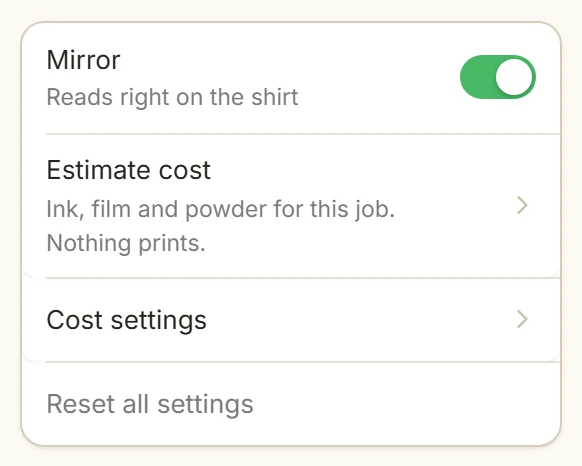
Set White for this job, and leave Mirror on.
Press Print.
More on each setting: How to print DTF transfers.
How long a roll can be
- Up to 10 m (32.8 ft) when the job is made into one file first.
- Up to 100 m (328 ft) when UPrint sends the job to PrintExp with Print long rolls while they are made on. Printing starts at once, while the rest of the roll is made.
One Fill the roll places up to 20,000 logos.
On a Mac, UPrint saves the job for the PrintExp PC, so a roll is up to 10 m (32.8 ft): DTF on a Mac.
What a gang sheet costs to print
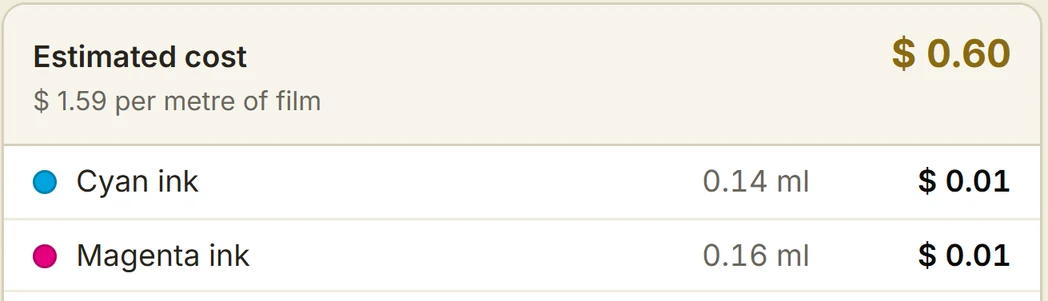
In Design RIP, Estimate cost works out the ink, film and powder for this job. Nothing prints. Type your own prices once, in Cost settings.
Estimate cost is in Design RIP. The UPrint Studio DTF RIP does not have it.
Which licence
- UPrint Design RIP with DTF: the design canvas and the DTF RIP in one window. From $40 a month for printers up to 45 cm (17.7 in) wide, $50 a month for wider ones. Prices.
- UPrint Studio DTF RIP: DTF jobs up to 45 cm (17.7 in) wide, on a page or a roll. $25 a month. Windows 10 or 11 for now. Prices.
Prices are in US dollars, plus tax worked out at checkout.
Which DTF printers they drive: the DTF printer list. White toner sheets: the OKI guide has Fill the sheet.
Try it on your own printer
7 day free trial, no card. Every tool, on your own computer. Download Design RIP and pick DTF printer when it starts. Install it on the Windows PC that runs PrintExp, or on a Mac that saves the jobs for that PC.
Download the free trialOn day 8 the app locks until you buy. Pay with the same email and it unlocks by itself. One free trial per computer and per email.
More guides
- DTFSet up your DTF printer and copy your colourTeach the app your printer from one small print, then copy the colour of the RIP you use now.
- DTFHow to print DTF transfers, step by stepFrom artwork to a pressed shirt: the steps, and what the RIP does in each one.
- DTFMoving from Maintop: bring your DTF settings to UPrintBring the printer settings and the colour you have in Maintop, from two prints.
- DTFDTF RIP software on a Mac: what works todayWhat you do on the Mac, and what the Windows PC with PrintExp does.
- White tonerSet up the RIP for your OKI white toner printerPick your OKI model, set the white, see where it goes, fill a sheet and print.